
IndieBunny Discord Bot
Get the latest indie game news and trailer notifications delivered directly to your Discord server — fully automatic.
See it in action — a real embed posted by the bot
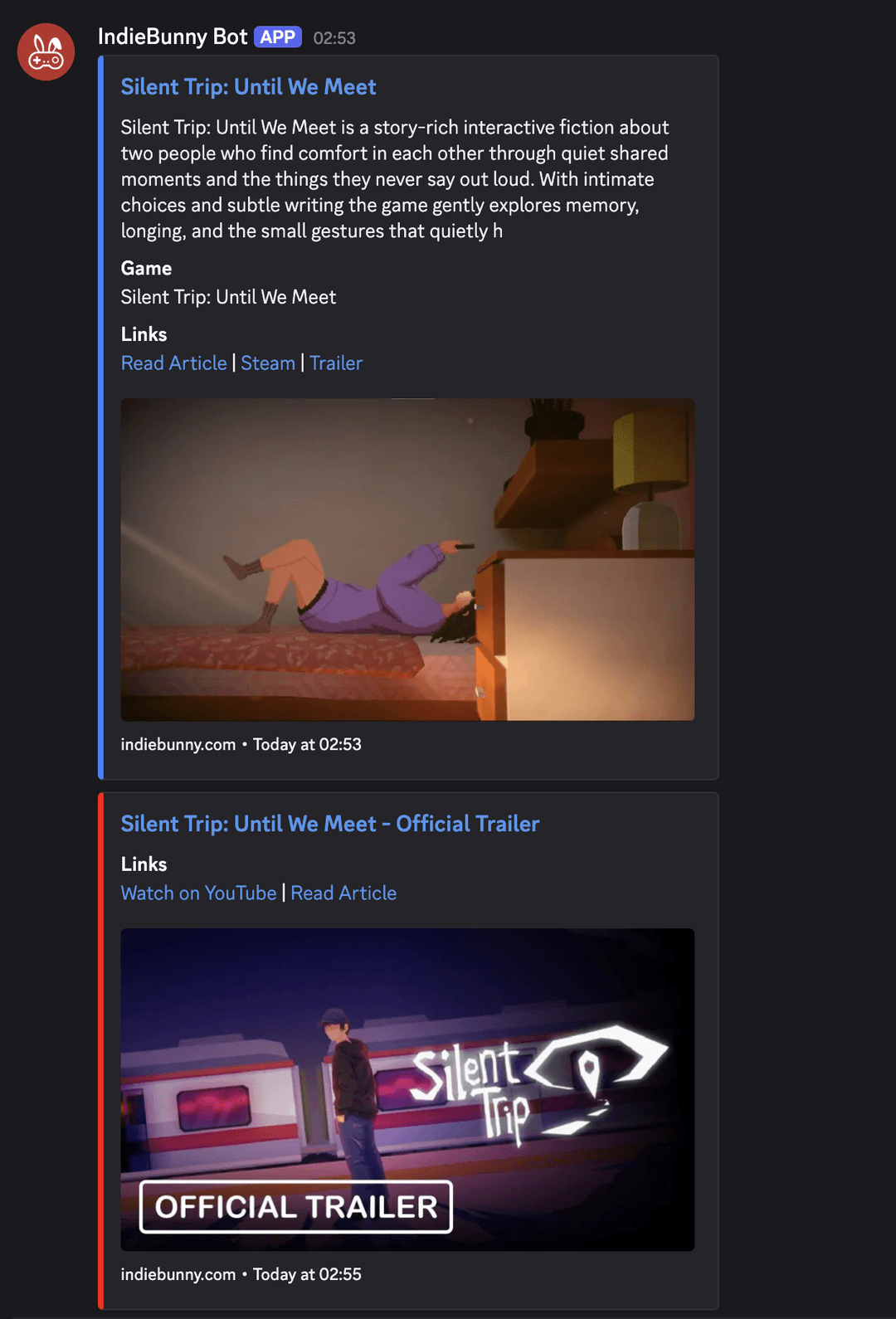
New articles
Every time an article is published on IndieBunny, the bot posts a rich embed with the title, excerpt, featured image, categories, and direct links.
New videos
When a game trailer goes live on our YouTube channel, the bot posts a video embed with a thumbnail and link to watch on YouTube.
Free games
The bot tracks Epic Games giveaways and Steam Free Weekends every 6 hours and posts them automatically — with price, store link, and offer end date.
What does the bot do?
The IndieBunny Bot automatically posts new content from indiebunny.com to your Discord server:
- New articles — Every time an article is published on IndieBunny, the bot posts a rich embed with the title, excerpt, featured image, categories, and direct links to the article, Steam page, and trailer.
- New videos — When a game trailer goes live on our YouTube channel, the bot posts a video embed with a thumbnail and link to watch on YouTube.
- Free games — The bot tracks Epic Games giveaways and Steam Free Weekends every 6 hours. As soon as a game becomes free, it gets posted automatically to your configured #free-games channel — including the original price, store link, and when the offer ends.
All posts are beautifully formatted as Discord embeds — no spam, no ads, just the content you care about.
How to add the bot to your server
- Click the invite link: Add IndieBunny Bot to your server
- Select your server from the dropdown and click “Authorize”. The bot needs the following permissions:
- Send Messages
- Embed Links
- Attach Files
- Set up a channel: Use the slash command
/indiebunny setup #your-channelto tell the bot where to post. You can add multiple channels if you want. - Done! The bot will now automatically post new articles and videos as they are published.
Available slash commands
All commands use the /indiebunny prefix. Only server members with the Manage Server permission can use these commands.
| Command | Description |
|---|---|
/indiebunny setup #channel | Add a channel where the bot will post new content. |
/indiebunny remove #channel | Remove a channel so the bot no longer posts there. |
/indiebunny channels | List all channels currently configured for the bot. |
/indiebunny mode <articles | videos | both> | Choose what the bot posts: only articles, only videos, or both (default). |
/indiebunny start | Activate the bot in your server. |
/indiebunny stop | Pause the bot — it will stop posting until you start it again. |
/indiebunny status | Show the current bot configuration (active, mode, channels). |
/indiebunny backfill [days] | Post content from the last N days (default: 5, max: 30). Great for catching up after first installing the bot. |
/indiebunny freegames set #channel | Set a dedicated channel for free games notifications from Epic Games and Steam. |
/indiebunny freegames remove | Remove the free games channel (stops free games posts). |
Quick start example
Here's a typical setup in just 3 commands:
/indiebunny setup #indie-game-news
/indiebunny mode both
/indiebunny backfill 5
This sets up the #indie-game-news channel, enables both articles and videos, and backfills the last 5 days of content so your members can see what they've missed.
Free Games Tracker
The bot automatically monitors two platforms for free games and posts them to your configured #free-games channel:
- Epic Games — Epic gives away one or more games every two weeks (usually on Thursdays). The bot detects these giveaways and posts them as soon as they go live, including the original price and the exact date the offer expires.
- Steam — Steam regularly runs Free Weekends where paid games temporarily become free to play. The bot detects 100 % discounts on normally paid games and posts them to your channel.
Both platforms are checked every 6 hours. Duplicate posts are automatically prevented — even after a bot restart.
To enable this feature, set a dedicated channel with one command:
/indiebunny freegames set #free-games
Frequently asked questions
Can I add the bot to multiple servers?
Yes! The bot supports multiple servers. Each server has its own independent configuration (channels, mode, active status).
What data does the bot store?
The bot only stores your server ID, server name, configured channel IDs, and your preferences (mode, active status). It does not store any personal data about your members, read messages, or track user activity. See our Privacy Policy for full details.
Can I use the bot in announcement channels?
Yes! The bot supports both regular text channels and announcement channels.
What happens when I remove the bot from my server?
All configuration data for your server is automatically deleted from our database. Previously posted messages remain in your Discord channels.
How fast does the bot post new content?
New articles are posted within seconds of being published on IndieBunny. YouTube videos are detected within 5 minutes of going public.
Which platforms are tracked for free games?
Epic Games (bi-weekly giveaways) and Steam (Free Weekends). The bot checks every 6 hours and prevents duplicate posts automatically. Set up your channel with /indiebunny freegames set #free-games.
The bot isn't posting — what should I do?
Check the following:
- Make sure the bot is active:
/indiebunny status - Make sure at least one channel is configured:
/indiebunny channels - Make sure the bot has permission to send messages and embed links in the configured channel
Join our community
Have questions, feedback, or want to chat about indie games? Join the IndieBunny Discord server:
Legal
By using the IndieBunny Bot, you agree to our Terms of Use and Privacy Policy.