{"title":"Big Walk Beginner Guide: 12 Dapat Malaman Bago ang Unang Session","seo_title":"Big Walk: Gabay para sa Baguhan - 12 Dapat Malaman","seo_description":"Maliwanag na gabay para sa unang sesyon ng Big Walk: hosting, max players, crossplay, at mga simpleng tips para mas maayos ang inyong paglalakbay.","excerpt":"Pangunahing gabay na walang malalaking spoilera para sa Big Walk: kung paano mag-host, ilan ang puwedeng maglaro, crossplay, at mga gawi para maging mas masaya ang unang ekspedisyon.","short_title":"Big Walk: Gabay para sa Baguhan","short_excerpt":"Mga dapat tandaan bago ang unang session ng Big Walk - hosting, crossplay, at gameplay basics.","content":"# Big Walk Beginner Guide: 12 Things to Know Before Your First Session\n\nBig Walk is not a traditional multiplayer game where everyone runs off, completes separate objectives and talks through a permanent team channel. It is a cooperative adventure built around staying together, getting lost and finding creative ways to communicate.\n\nThat makes your first session important. A little preparation can prevent technical confusion, protect your group’s progress and help everyone experience Big Walk as intended.\n\nThis spoiler-light beginner guide explains how hosting works, how many people can play, how to join friends across different platforms and which habits will make your first expedition more enjoyable.\n\n## Big Walk quick answers\n\n| Question | Answer |\n| --------------------------------- | -------------------------------------------------------------------------- |\n| How many people can play? | 2-12 players |\n| Can you play solo? | You can walk around briefly, but the adventure is designed for multiplayer |\n| Does Big Walk have crossplay? | Yes |\n| Is there random matchmaking? | No |\n| Is a microphone required? | No; proximity-based text chat is also available |\n| Who stores the save? | The host |\n| Does progress save automatically? | Yes |\n| Which platforms are supported? | Windows, Mac, PlayStation 5 and Nintendo Switch 2 |\n\nBig Walk is available on Steam for Windows and Mac, the Mac App Store, PlayStation 5 and Nintendo Switch 2. It supports groups of two to twelve players, with crossplay between supported systems.\n\n## 1. Choose your host carefully\n\nBefore anybody starts exploring, decide which player should host the session.\n\nThe host is the keeper of the group’s save. Big Walk automatically stores progress for the host, and that same person will generally need to host again when the group wants to continue its adventure.\n\nWhen the host ends the session, everyone else is disconnected. For that reason, the best host is not necessarily the person with the fastest computer or the most gaming experience. Choose someone who:\n\n* Is likely to attend most sessions\n* Has a stable internet connection\n* Can reliably organize the group\n* Is comfortable being responsible for the main save\n\nChanging which friend hosts later will not simply move the existing adventure to that person. Agreeing on a dependable host at the beginning can prevent a great deal of frustration.\n\n## 2. Pick the right world version\n\nWhenever the host starts a session, they choose one of three versions of the world:\n\n* A two-player version\n* A three-player version\n* A four-or-more-player version\n\nThis choice is better understood as the minimum dependable group size, not the maximum number of friends who may join."}
Kung anim ang nagbabalak maglaro pero tatlo lang ang kayang dumalo kada session, mas ligtas pumili ng three-player na bersyon kaysa mag-set ng apat o higit pa. May mga bahagi ng laro na umaangkop sa napiling laki ng grupo, at dapat pa rin makausad ang inyong grupo kapag paminsan-minsan ay may absent na manlalaro.
Walang iisang perpektong laki ng grupo para sa lahat. Dalawang manlalaro ang nagbibigay ng mas nakatutok na cooperative experience, samantalang kapag papalapit sa labindalawa ang bilang ng grupo, nagiging mas magulo ito. Parehong valid na paraan ng paglalaro ang mga iyon.
3. Sumali gamit ang friends list o Join Code
Karaniwan may dalawang paraan para kumonekta ang mga manlalaro sa host.
Platform friends list
Kapag magka-friends ang dalawang manlalaro sa parehong platform service, dapat lumabas ang aktibong host session sa menu ng magagamit na friends’ games.
Join Code
Para sa cross-platform na grupo o sa mga hindi nakakonekta sa iisang friends service, maaaring mag-share ng Join Code ang host.
Bago magsimula, nagge-generate ng bagong code kapag sinimulan ng host ang session. Makikita ito sa sulok ng host menu bago pumasok sa laro. Pagkatapos magsimula ang session, makikita ng host ang code sa pamamagitan ng pagbukas ng in-game menu at pagpili ng Session Details.
Mahahalaga rin ang Join Codes para sa Mac App Store na bersyon, dahil hindi nito ginagamit ang Game Center para ipakita ang aktibong friends’ games.
4. Huwag gawing Discord ang pangunahing voice channel
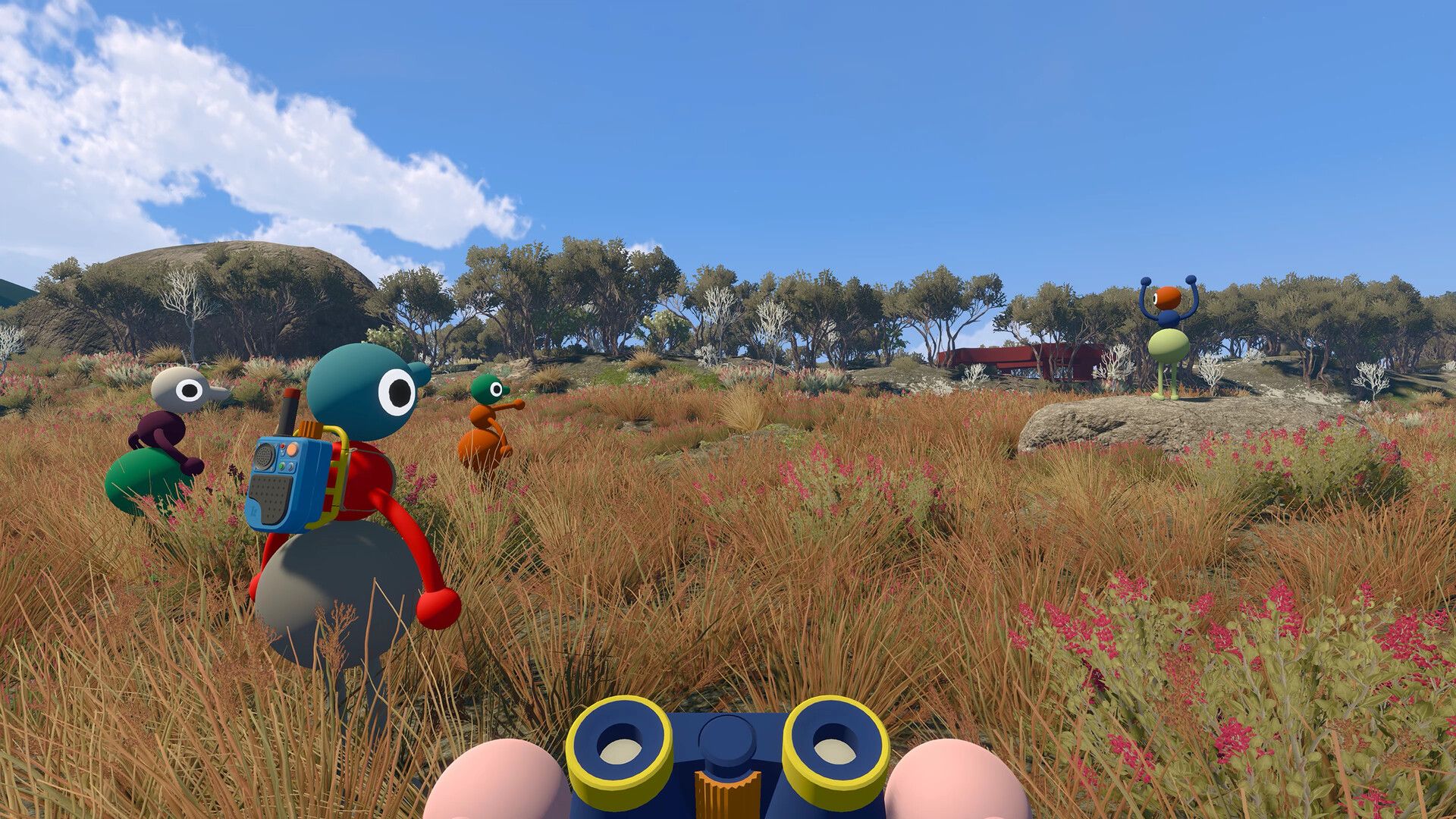
Sa karamihan ng cooperative games, makatuwiran ang magbukas ng Discord bilang paghahanda. Sa Big Walk, tinatanggal nito ang isang sentral na bahagi ng laro.
Ang voice system ng Big Walk ay kumikilos na parang tunog sa loob ng mundo. Ang mga boses:
- Lumulubha ang hina habang lumalayo
- Umaalingawngaw sa mga koridor at saradong espasyo
- Nananakit kapag may pader o terrain na humahadlang
- Kumakagulay kapag ipinapadala sa pamamagitan ng walkie-talkies
Sinasadyang idinisenyo ang mga problemang ito sa komunikasyon. Maaaring mawalan ka ng kontak sa kaibigan, magkamali ng pagkakaintindi sa utos o kailangan mong mag-signal sa malayong distansya nang hindi nagsasalita. Bahagi ng pakikipagsapalaran ang paglutas sa mga iyon.
Ang external voice call ay nagpapahintulot sa lahat na marinig ang isa’t isa nang palagian. Maaari nitong lampasan ang mga puzzle, alisin ang mga hindi inaasahang sitwasyon at gawing hindi gaanong kailangan ang ilang communication tools. Gamitin ang built-in chat maliban na lang kung may accessibility reason ang inyong grupo para hindi gawin iyon.
5. Maaari kang maglaro nang walang mikropono
Hinahikayat ang pagkakaroon ng mikropono, pero hindi ito mandatory.
May text chat ang Big Walk na may parehong sinadyang limitasyon tulad ng voice chat. Maaaring hindi mabasa ang mga mensahe kapag masyadong magkalayo ang mga manlalaro o may naghahating bagay na humahadlang sa tunog. Maaaring makipag-ugnayan ang text communication sa mga tool tulad ng walkie-talkies.
Ibig sabihin nito, ang isang taong hindi makapagsalita o mas gustong huwag magsalita ay maaari pa ring makibahagi sa buong pakikipagsapalaran. Puwede ring pagsamahin ang voice at text, para magamit ng bawat miyembro ng grupo ang paraan na pinakaakma sa kanila.
6. Subukan ang proximity chat bago umalis
Gugulin ang unang ilang minuto para matutunan kung gaano kabilis nagbabago ang komunikasyon depende sa distansya.
Tumayo sa tabi ng isa pang manlalaro at magsalita nang normal. Pagkatapos ay dahan-dahang lumayo habang nagpapatuloy sa pag-uusap. Pansinin kung kailan humihinahon, nagiging malabo at hanggang sa hindi na marinig ang boses nila.
Itinuturo ng simpleng test na ito ang isa sa pinakamahalagang aral ng Big Walk: ang pagiging malapit na nakikita ay hindi palaging nangangahulugang nasa kapaki-pakinabang na distansya para makipagsalita.
Testing your microphone early also gives everyone time to check their audio settings. In Mga Setting > Audio, confirm that the microphone activity indicator responds when you speak. Check whether your mute control is configured as a hold or toggle action.
Finding an audio problem near the starting point is much easier than discovering it after half the group has disappeared over a hill.
7. Name landmarks instead of giving camera-based directions
Directions such as “turn left” or “look behind you” often fail in a first-person multiplayer game. Your friend may be facing a completely different direction.
Use visible landmarks instead:
- “Wait beside the red structure.”
- “Meet at the split tree.”
- “Go towards the tall tower.”
- “I’m below the large bridge.”
Give important locations short, memorable names as soon as the group finds them. Shared names create a basic vocabulary that becomes increasingly useful as the world opens up.
For larger groups, say the intended player’s name before giving an instruction. One clear message to a specific person works better than shouting a general request into a crowd.
8. Make a plan before splitting up
Staying together should be your group’s default behaviour, especially during the first session.
Some situations will require players to separate. Before that happens, agree on:
- Who is going where
- What each person is trying to find or activate
- Where everyone will meet again
- Which signal means “return now”
- What to do if communication is lost
Once players move out of speaking range, creating a new plan becomes much harder. A ten-second conversation before separating can prevent ten minutes of confused searching.
When possible, repeat important instructions back to the person giving them. Confirmation may sound unnecessary, but proximity effects and overlapping voices make misunderstandings common.
9. Match communication tools to the distance
Big Walk contains tools and toys that help players communicate in different situations.
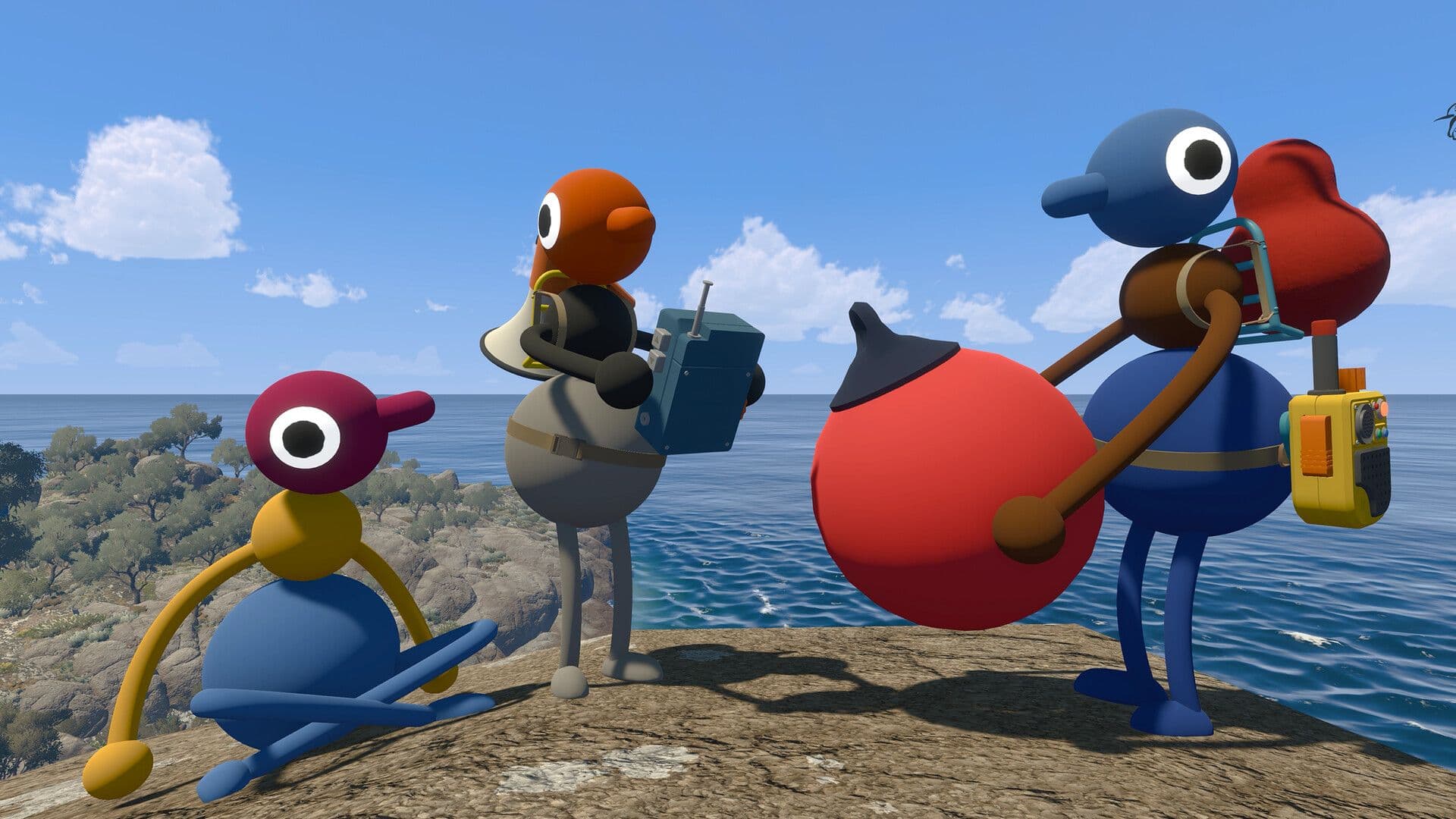
Use ordinary speech when everyone is nearby. A megaphone can help project a voice across open ground, while a walkie-talkie is more suitable when teammates are farther away or out of sight.
Not every message requires words. A flare may reveal a player’s position, a cowbell can help gather nearby teammates and gestures can communicate simple intentions. Whiteboards are useful when a puzzle involves a sequence, drawing, code or complicated set of instructions.
Avoid turning every tool into background noise. Repeated flares, constant bell ringing and several people speaking over radios at once can make the group harder, not easier, to understand.
10. Configure controls and accessibility settings first
Big Walk supports both mouse and keyboard and game controllers. Controls can be changed under Settings > Rebinding.
Before starting the adventure, every player should check:
- Movement and interaction controls
- Mute or push-to-talk behaviour
- Text-chat input
- Controller sensitivity
- Crosshair preference
- Hold-versus-toggle options
- Field of view
Pinapayagan din ng laro ang host na paganahin ang pag-skip ng challenge sa pamamagitan ng accessibility menu kapag nagsisimula ng session. Maaari itong gamitin kapag ang isang challenge ay nangangailangan ng kakayahang hindi komportable ibigay ng isang manlalaro, tulad ng pandinig, pagbabasa, pagsasalita, pagta-type, mabilis na pag-react o paggawa ng tumpak na input.
Ang pag-skip ng challenge ay isang accessibility feature, hindi isang kabiguan. Ang pag-enable nito bago magsimula ay nagsisiguro na may opsyon ang grupo kung sakaling may makakaharap ng hindi maa-access na bahagi.
11. Subukan ang mga option para bawasan ang motion
Ang mga manlalarong nakararanas ng hindi komportable sa mga first-person na laro ay dapat bumisita sa settings menu bago mag-explore.
Nagbibigay ang Big Walk ng Motion Reduction Overlays sa ilalim ng Settings > General. Nagdadagdag ito ng visual overlay na nilalayong tumulong sa manlalaro na makaramdam ng mas grounded.
Maaari mo ring i-adjust ang field of view sa ilalim ng Settings > Graphics. Ipinapayo ng opisyal na gabay na subukan ang mas mataas na value ng field of view, na nagpapakita ng mas malaking bahagi ng paligid at maaaring mabawasan ang pakiramdam ng claustrophobia o motion sickness.
Gawin ang mga pagbabago nang paunti-unti at subukan agad sa simula ng laro. Mas mahalaga ang komportableng setup kaysa gamitin ang default na presentasyon.
12. Ituring ang mga pagkakamali bilang bahagi ng pakikipagsapalaran
Ang communication system ng Big Walk ay dinisenyo para lumikha ng hindi perpektong mga plano.
May maiintindihang landmark nang mali. May teammate na lalakad palabas ng abot ng boses. Ang maingat na ipinaliwanag na istratehiya ay babagsak dahil sabay-sabay magsasalita ang ilang manlalaro.
Hindi nito nangangahulugang hindi magaling maglaro ang inyong grupo. Ang miscommunication ay isa sa mga sistema na lumilikha ng mga pinakamakakatawa at hindi malilimutang sandali sa Big Walk.
Subukan na iwasang lutasin ang bawat problema nang pinakamabisang paraan palagi. May kumpletong simula, gitna at wakas ang laro, pero idinisenyo din ang mundo nito para maging lugar kung saan pwedeng mag-spend ng oras ang mga magkakaibigan. Hindi kailangang magmadali sa bawat tuklas.
First-session checklist
Bago simulan ang unang Big Walk, tiyakin na:
- May hindi bababa sa dalawang manlalaro
- Napili ng grupo ang isang maaasahang host
- Pinili ng host ang angkop na world version
- Natanggap ng cross-platform na mga manlalaro ang Join Code
- Na-check ng lahat ang kanilang mikropono o text chat
- Naka-disable ang external voice-chat software
- Na-review ang controls at accessibility settings
- Nasubukan ang motion-reduction settings kung kinakailangan
- Nauunawaan ng grupo na sa host napupunta ang progreso
- Alam ng lahat na bahagi ng karanasan ang maligaw
Frequently asked questions
Pwedeng maglaro ng Big Walk nang solo?
Walang full single-player mode ang Big Walk. Maaaring magsimula ng session at maglakad-lakad ang isang tao, pero pinipigilan ng cooperative challenges ang makahulugang pag-usad nang wala ang kahit isa pang manlalaro.
Ilan ang sinusuportahang manlalaro ng Big Walk?
Sumusuporta ang isang session ng pagitan ng dalawa at labindalawang manlalaro. Pinipili ng host ang isang world na dinisenyo para sa dalawang, tatlo o apat-o-higit pang kalahok.
Sinusuportahan ba ng Big Walk ang crossplay?
Oo. Maaaring sumali sa parehong session ang mga manlalaro sa mga suportadong sistema, kabilang ang Windows, Mac, PlayStation 5 at Nintendo Switch 2.
May matchmaking ba ang Big Walk?
Wala. Walang random online matchmaking. Idinisenyo ang laro para sa isang grupong babalik sa parehong adventure sa maraming session.
Kailangan ba ng mikropono ang bawat manlalaro?
Hindi. Sinusuportahan ng Big Walk ang proximity-based text chat na may katulad na features at limitasyon sa voice system nito.
Ano ang nangyayari kapag umalis ang host?
Ang sesyon ay nagtatapos at ang ibang mga manlalaro ay nade-disconnect. Awtomatikong nasasave ang progreso ng host.
Maaari bang magpatuloy ang ibang manlalaro nang wala ang orihinal na host?
Hindi mula sa parehong hosted adventure. Para ipagpatuloy ang umiiral na progreso ng grupo, kailangang muli mag-host ang manlalarong may hawak ng save.
Maaari bang maglaro ang mga kaibigan sa parehong silid?
Inirerekomenda ng House House na iwasan ito dahil maririnig ng mga manlalaro ang bawat isa nang hindi dumadaan sa proximity system ng laro. Maaari namang maglaro ang mga nakatira sa iisang bahay mula sa magkakahiwalay na kwarto at device para mapanatili ang komunikasyon sa loob ng laro.
May katapusan ba ang Big Walk?
Oo. Isa itong handcrafted cooperative adventure na may simula, gitna at wakas. Maaari pa ring gamitin ang mundo bilang isang maginhawang lugar para magpalipas-oras kasama ang mga kaibigan pagkatapos nito.
Huling payo para sa mga nagsisimula
Ang pinaka-kapaki-pakinabang na tip sa Big Walk ay simple: huwag subukang alisin ang bawat abala.
Manatiling sapat ang lapit para makapagusap, magplano bago maghiwalay at alamin kung aling mga kasangkapan ang tumutulong sa iba’t ibang distansya, pero hayaang mabigo ang ilang plano. Ginagawang bahagi ng adventure ng Big Walk ang maligaw, hindi pagkakaintindihan at muling pagkikita.
Pumili ng maaasahang host, gamitin ang built-in chat at magsimula kasama ang mga kaibigang may pasensya. Ang iba pa ay pinakamainam na tuklasin nang magkakasama.